
“Data protection” gets used to mean a dozen different things. Strip it back and your data is only ever in one of two states: sitting somewhere, or moving between two places. Almost every real exposure happens in one of those two, and most organisations have covered one of them properly and quietly assumed the other.
The assumption usually runs in the same direction. The disks are encrypted, so the data is safe. That sentence is doing an enormous amount of work, and very little of it survives contact with how the systems actually run.
Decide what actually needs protecting
Encrypting everything to the same standard is as unhelpful as encrypting nothing. It costs performance, it complicates recovery, and it spreads your attention evenly across data that does not deserve it. Start by sorting what you hold by what it is and what obligation attaches to it:
- Regulated. Personal data, health records, cardholder data, controlled unclassified information. Somebody outside your business has already decided how this must be handled, and the penalties are defined.
- Commercially sensitive. Contracts, pricing, pipeline, designs, source code. Nobody will fine you, but losing it changes your position.
- Credentials and keys. Passwords, API keys, private keys, tokens, service account details. The highest value per byte you hold, and routinely the worst protected, because they live in config files and scripts rather than in databases.
- Everything else. Protect it with the defaults and spend your effort above.
Then ask the question that actually finds problems: for each of those, where does it live, and where does it travel? Most organisations can name the database immediately and miss the nightly export sitting on a file share, the report emailed every Monday, the extract somebody pulled into a spreadsheet, and the copy in the test environment.
Pick one regulated dataset and follow it from the moment it is created to every place it comes to rest. It almost always ends up somewhere nobody listed.
Data at rest: what each layer actually protects
“Encrypted at rest” is not one thing. It is four or five different controls that protect against different threats, and they are not interchangeable.
Full-disk and self-encrypting drives
This is the layer most people mean, and it protects against exactly one scenario: a disk leaving the building. A stolen laptop, a decommissioned array, a drive returned under warranty with data still on it. For that threat it works, and every organisation should have it.
It does nothing at all while the system is running. Once the volume is mounted, the operating system presents plaintext to every process and every account with the right permissions. The encryption is transparent by design — that is the entire point of it. So an attacker with valid credentials, a user with over-broad access, or a compromised service account reads your data exactly as if no encryption existed.
This is the single most important thing to understand about encryption at rest, because stolen credentials are how most breaches actually happen. Full-disk encryption is not a control against the threat you are most likely to face.

Filesystem and per-directory encryption
A narrower blast radius: individual directories keyed to individual users, so one compromised account does not expose the whole volume. Still transparent to the authenticated owner, but it stops an attacker who lands as the wrong user, which full-disk encryption does not.
Database encryption
Transparent data encryption protects the database files on disk. It is the same bargain as full-disk encryption, one level up: anything that can authenticate to the database gets plaintext, including a compromised application account and including your administrators.
Column-level encryption changes the threat model properly, because the keys live outside the database and the engine never sees plaintext. SQL Server’s Always Encrypted is the clearest example. It costs you the ability to query those columns freely, which is exactly why it should be reserved for the handful of fields that genuinely warrant it.
Application-level encryption
The application encrypts before storing, so the datastore never holds anything readable. The most work, the strongest separation, and the right answer for a small amount of genuinely sensitive data.
And then the part that decides whether any of it works
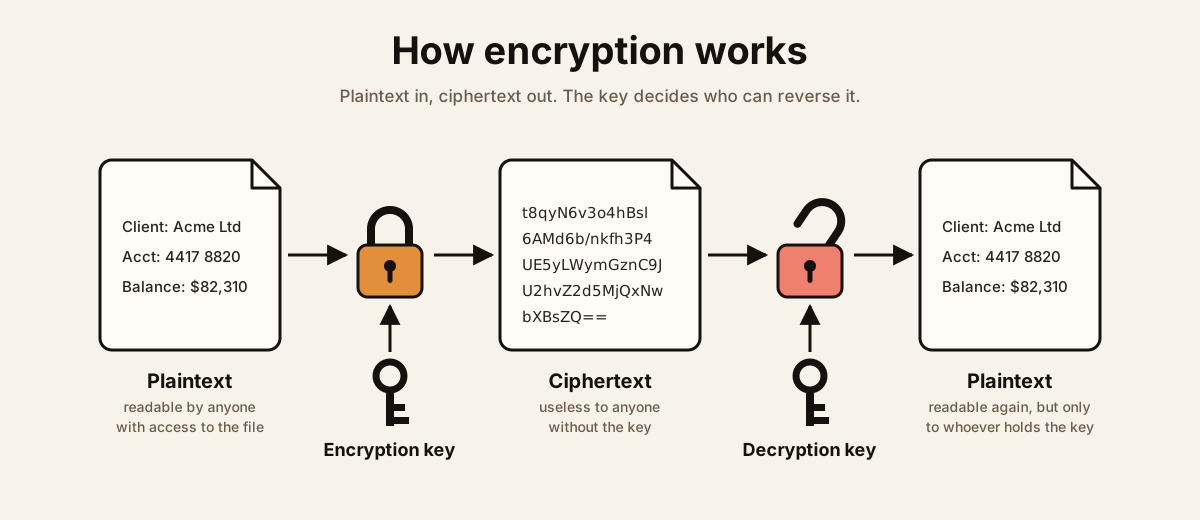
Encryption does not remove the problem of protecting data. It converts it into the problem of protecting keys, and that conversion is only a win if you then treat the keys differently from the data.
A key stored on the same server as the data it protects, readable by the same account, is encryption with extra steps. Keys belong in a key management service or a hardware security module, under separate access control, with rotation and an audit trail. The real access question is not who can read the file. It is who can decrypt it.
Data in transit: the edge is the easy half
Nearly everyone has HTTPS on the public website. That is the visible half, the half that gets audited, and the half attackers care about least. Inside the perimeter, it is common to find almost everything still moving in plaintext.
The traffic that is usually unprotected:
- Application to database. Most database drivers will connect without TLS unless you force them to, and most do.
- File shares. SMB signing and encryption are off by default on older configurations, so file contents cross the network in the clear.
- Directory traffic. Plain LDAP carries credentials. If it is not LDAPS or using channel binding and signing, anyone on the path can read authentication attempts.
- Management interfaces. IPMI, iLO, iDRAC, switch and firewall administration, hypervisor consoles. Full control of your infrastructure, often over HTTP or an old TLS version.
- Monitoring and logging. Syslog and SNMP are plaintext by default, and your logs contain a detailed description of your environment.
- Backup and replication traffic. Every byte you protect at rest, crossing the network unprotected on its way to the other site.
“It is on our internal network” is not a control. It is an assumption about a flat network that an attacker only has to break once — one compromised workstation, one guest VLAN that is not really separate, one contractor laptop.
Getting the details right
- Versions. Disable SSL 3.0, TLS 1.0 and TLS 1.1. TLS 1.2 as the floor, TLS 1.3 where both ends support it.
- Certificates. Expiry causes more outages than any attack. Run an internal certificate authority for internal services, automate renewal, and alert well before the date.
- Mutual TLS where both ends should prove who they are, rather than only the server. This is what stops an attacker who can reach a service from simply talking to it.
- Email. SMTP encryption is opportunistic by default: if the far end does not offer TLS, most servers silently send in the clear. Enforce it with MTA-STS and DANE where you can, and use S/MIME or a secure portal for content that genuinely cannot be exposed.
- VPN is not a substitute. A VPN protects the tunnel between two points. It does not encrypt the application traffic at either end, and it does not help once an attacker is inside the tunnel. Use both.
The gaps between the layers
Most real exposure is not a broken algorithm. It is plaintext sitting somewhere nobody thought about:
- TLS terminates at the load balancer. What happens on the next hop is a separate decision, and it is frequently plaintext because the traffic is now “internal”.
- Logs, temp files, swap and crash dumps. Applications write plaintext into all of these routinely. A debug log containing full request bodies undoes a great deal of careful encryption.
- Test and development environments. Production encrypted to a high standard, with a plaintext copy of the same customer data in a test database that nobody patches. This is common rather than rare.
- Backups and snapshots. A copy taken from an encrypted volume is frequently written out in plaintext unless the backup system encrypts separately. Worth checking rather than assuming — and worth proving by actually performing a restore.
- Endpoints. Data decrypted onto a laptop is data at rest on a laptop, now outside every control you built in the data centre.
What is already free on Linux
- LUKS and dm-crypt — full-disk encryption, managed with
cryptsetup. Pair it with Clevis and Tang for network-bound unlock so an encrypted server can reboot unattended without storing the passphrase on the box. - fscrypt — native per-directory encryption on ext4 and f2fs, keyed per user rather than per volume.
- GnuPG and age — file-level encryption.
ageis the modern, far simpler option when you do not need the full web of trust. - OpenSSH — the default transport for administration and for file movement, through
sftpandrsync -e ssh. - WireGuard — in-kernel, fast, and short enough to configure that it actually gets deployed. strongSwan where you need interoperable IPsec.
- stunnel — wraps a legacy plaintext protocol in TLS without touching the application. The pragmatic answer for software you cannot change.
- certbot and Let’s Encrypt — free certificates with automatic renewal, which solves the expiry problem rather than just the cost one.
- Database TLS — PostgreSQL with
ssl = onandhostsslrules inpg_hba.conf; MySQL and MariaDB withrequire_secure_transport. Both are off by default and both are a few lines to fix. - Encrypted swap — easy to forget, and it holds whatever was in memory.
What is already free on Windows
- BitLocker — full-disk encryption with TPM backing, recovery keys escrowed to Active Directory or Entra ID. Use Network Unlock for servers that must reboot without someone at the console.
- SMB encryption —
Set-SmbServerConfiguration -EncryptData $true, plus SMB signing. One command closes file-share traffic that is otherwise readable on the wire. - LDAP channel binding and signing, and LDAPS — so directory authentication stops crossing the network in the clear.
- IPsec through Windows Firewall with Advanced Security — encrypt traffic between servers without touching the applications, and use it to isolate segments.
- Active Directory Certificate Services — your own internal certificate authority, so internal services get real certificates instead of self-signed ones everyone has trained themselves to click past.
- Schannel hardening via Group Policy — disable the obsolete protocol versions and set cipher suite order centrally.
- SQL Server — Force Encryption for connections, Transparent Data Encryption for the files, and Always Encrypted for the columns that need keys held away from the database.
- RDP — require Network Level Authentication and TLS, and stop using the default self-signed certificate.
- Always On VPN — the current built-in answer for remote access.
When the requirement says FIPS
Once you are selling to government, defence, healthcare or finance, “we encrypt everything” stops being sufficient and a specific standard appears in the contract. It is worth being precise about what that standard actually covers, because this is widely misunderstood.
FIPS 140-3 validates cryptographic modules, not products. It is a NIST standard, administered through the Cryptographic Module Validation Program, and what receives a certificate is the module that performs the encryption — a library, a firmware component, an HSM. A product is not “FIPS certified”; it either uses a validated module correctly, or it does not.
Two practical consequences follow, and they are where most procurement goes wrong:
- “FIPS-compliant” is marketing. “FIPS 140-3 validated, certificate number such-and-such” is a fact you can verify yourself in the CMVP search. “Uses AES-256” means nothing on its own — the algorithm is not what gets validated, the implementation is.
- FIPS mode has to be switched on. A validated module running outside its approved mode does not satisfy the requirement. That means
fips-mode-setup --enableon RHEL, the Use FIPS compliant algorithms security policy on Windows, the FIPS provider in OpenSSL 3, and the FIPS toggle on appliances — then confirming your software calls that module rather than bundling its own cryptography.
Note the version. FIPS 140-2 certificates move to the CMVP historical list in September 2026, and new validations have been issued against 140-3 for some time. If you are signing a contract now, specify 140-3.
Who actually requires it
- US federal agencies and their contractors — through FISMA and FedRAMP, where FIPS-validated cryptography is explicit for data at rest and in transit.
- Defence suppliers — NIST SP 800-171 control 3.13.11 requires FIPS-validated cryptography to protect controlled unclassified information, and that flows down through DFARS and CMMC.
- Healthcare — HIPAA does not name FIPS. But its breach-notification safe harbour depends on data being rendered unusable through encryption consistent with NIST guidance, and that guidance points at FIPS-validated modules. In practice, FIPS validation is how you demonstrate the safe harbour applies.
- Finance — usually by contract and auditor expectation rather than statute.
What fits at mid-market and enterprise scale
- The platform you already run. Red Hat Enterprise Linux ships validated modules and a system-wide FIPS mode; Windows ships validated CNG modules. Turning these on is cheaper and far more defensible than buying a product.
- Key custody — Thales Luna, Entrust nShield, AWS CloudHSM and Azure Key Vault Managed HSM for keys that must sit in a FIPS 140 Level 3 device rather than in software. This is normally the control an auditor cares most about.
- Enterprise key and data protection platforms — Thales CipherTrust, Entrust KeyControl, Fortanix, where keys and policy need managing centrally across many systems rather than per server.
- Cloud — AWS and Azure both expose FIPS endpoints, with GovCloud and Azure Government for the regulated case. Using the normal endpoints does not meet the requirement, which is an easy and expensive thing to miss.
- Databases — SQL Server and Oracle both support external key management, so TDE keys live in the HSM rather than beside the database.
One honest caveat about the free tools above. Several of them — age among them — are excellent and are not FIPS-validated. Where FIPS is contractual, they cannot be the layer performing the encryption that satisfies it. Confirm with your auditor before you build on them, not after.
What to do this week
- Pick one regulated dataset and map every place it rests and every hop it travels. Expect surprises.
- Check whether your application-to-database traffic is encrypted. It usually is not, and it is usually a configuration change rather than a project.
- Turn on SMB encryption and signing, and move directory traffic to LDAPS.
- Find out where your encryption keys are stored. If the answer is “on the same server”, that is the first thing to change.
- Inventory your certificates and their expiry dates, then automate the renewals.
- Check what your applications write to logs and temp files, and whether your test environments hold real data.
Encryption is not a box you tick on a disk. It is a set of decisions about where your data is readable, and by whom — and the honest answer is usually “in more places than we thought”.