
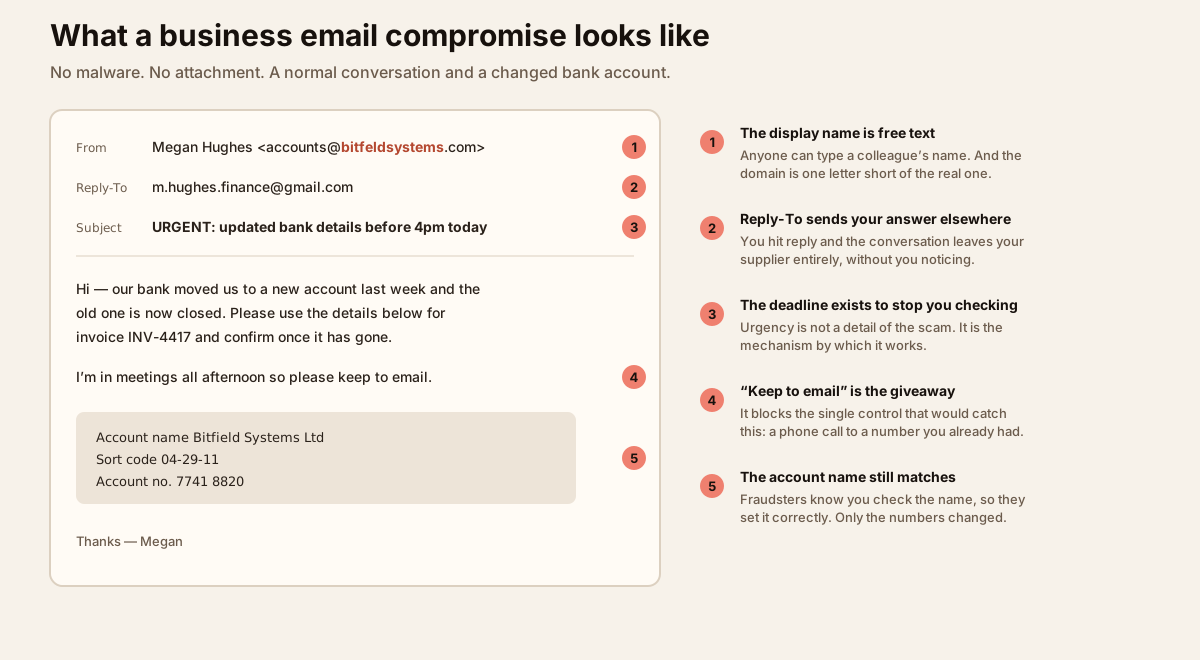
Most security budgets are spent on the things that make a noise. Phishing makes no noise at all. There is no payload to detect, no exploit to block, and frequently nothing technically wrong with the message — it genuinely comes from a real mailbox, often one belonging to a supplier you have worked with for years.
That is why it remains the most common way an intrusion starts, and why the single most expensive category of email fraud involves no malicious code whatsoever.
Why it still works
Phishing does not attack your software. It attacks your process — the fact that somebody in your organisation is authorised to pay an invoice, change a bank record, or reset a password, and that they are busy.
The old advice has quietly expired. We taught people to look for broken English, generic greetings and odd formatting. Those were never the attack; they were just the attacker’s mistakes, and that category of mistake is now gone. A message can be written in fluent, idiomatic English, in your industry’s vocabulary, referencing a real project, addressed to the right person by name — assembled from your website, a press release and a few public profiles.
So “look for the typos” is no longer a control. What is left is process, authentication and a small number of technical measures that work regardless of how convincing the writing is.
The scams that actually hit businesses
Business email compromise
The costliest by a distance, and the one in the diagram above. There is no link and no attachment, just a request to change where money goes. Sometimes the sender is a lookalike domain; sometimes it is genuinely your supplier’s real mailbox, because they were compromised first and the attacker has been reading the thread for weeks, waiting for a real invoice to arrive.
Credential harvesting that defeats MFA
A convincing Microsoft or Google sign-in page, except it is a proxy. You type your password into it, it passes that to the real service, the real service sends your MFA prompt, you approve it — and the proxy captures the session cookie that comes back. The attacker is now signed in as you without ever knowing your password or needing your phone again.
This is the important part: app-based and push MFA do not stop it. Only phishing-resistant MFA does, because a passkey or security key is cryptographically bound to the real domain and simply refuses to authenticate to the fake one.
The quiet follow-up: mailbox rules
Once inside, the first thing a competent attacker does is create an inbox rule — move anything containing “invoice” or “payment” to a rarely-used folder, or auto-forward it outside. The victim never sees the replies, so nobody notices for weeks. New inbox rules and new forwarding addresses are among the highest-value things you can alert on.
The rest of the catalogue
- Payroll diversion. A short, polite message to HR asking to update direct deposit details before the next run.
- Thread hijacking. A reply injected into a genuine existing conversation, quoting real history, which defeats almost every instinct a reader has.
- QR codes in email. The click moves to a personal phone, outside your filtering, your managed browser and your endpoint protection.
- Gift card and “are you at your desk?” requests. Low value individually, but they cost nothing to send and they still land.
Proving your mail is really yours
Three DNS records decide whether somebody else can send email that appears to come from your domain. They are free, they are not optional any more, and a surprising number of businesses have one or two of them and assume that is the job done.
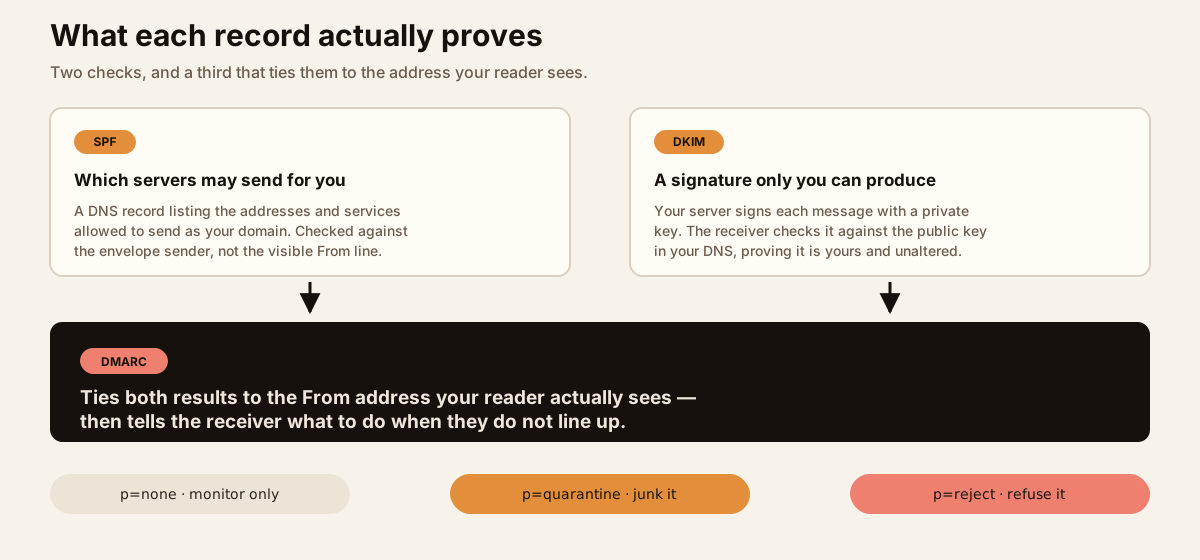
The distinction that catches people out is that SPF is checked against the envelope sender, not the From address shown in the mail client. A message can pass SPF perfectly while displaying any From address the sender likes. DMARC exists precisely to close that gap, by requiring the authenticated domain and the visible one to align.
Without a DMARC record at enforcement, anyone can send email that appears to come from your domain, and each receiving provider decides for itself what to do about it. That is not only an inbound problem: it is your customers, your suppliers and your own staff receiving convincing mail with your name on it.
Two more worth having once DMARC is in place: MTA-STS, which stops mail to your domain silently falling back to an unencrypted connection, and TLS-RPT, which tells you when it does.
On-premises or hosted: what changes and what does not
This is where a lot of businesses either relax too early or worry about the wrong thing.
Hosted with Microsoft 365 or Google Workspace
The provider runs the infrastructure, patches it, and gives you a competent baseline filter. That is a genuine reduction in work, and for most small and mid-sized organisations it is the right choice. What it does not do is hand over responsibility for configuration, identity or people. The gaps we find most often:
- Legacy authentication protocols still enabled, which bypass modern access controls entirely.
- Anti-phishing and impersonation protection left on defaults, with no protected-sender list for executives and finance staff.
- Administrator accounts on push-based MFA rather than phishing-resistant keys.
- Unrestricted OAuth app consent, so a user can grant a third-party application standing access to their mailbox without anyone reviewing it.
- External auto-forwarding permitted, which is how a compromise becomes a long-term data leak.
On-premises Exchange
You own all of it: the patching, the edge, the filtering, your sending reputation, the certificates, the backups. Exchange has had a sustained run of critical vulnerabilities that were exploited in the wild within days of disclosure, which puts an on-premises server firmly in the tier that gets patched in days rather than at the next maintenance window.
It is still a legitimate choice — regulatory, contractual or data-residency reasons are real. But it should be a decision somebody made deliberately, with the patching commitment understood, rather than something that persists because migrating looked like work.
The hybrid trap
The most common problem we see is neither of the above. It is the organisation that migrated to the cloud years ago and left one on-premises Exchange server running “just for relay” or “just for that one application”. It is rarely patched, rarely monitored, frequently reachable from the internet, and nobody owns it. If that describes your environment, that server is the most urgent item on your list.
Where your mail is hosted changes who patches the server. It does not change who owns the risk. Authentication records, identity configuration, payment process and the people reading the messages are yours in every model.
The controls that move the needle
Roughly in order of how much difference they make per hour spent:
- Phishing-resistant MFA — passkeys or hardware security keys, administrators and finance first. This is the one control that defeats the proxy attacks that beat push notifications.
- Out-of-band verification for payments. Any change to bank details is confirmed by phone, on a number you already held — never a number in the email. One process rule prevents most business email compromise losses.
- Block legacy authentication, and apply conditional access based on device compliance and risk.
- DMARC at
p=reject, reached deliberately vianoneandquarantine. - External sender banners. Unglamorous, nearly free, and they break the illusion in exactly the moment that matters.
- Disable external auto-forwarding, and alert on new inbox rules.
- A report button that is easier to press than deleting the message, and training that measures behaviour rather than punishing people. Somebody who reports a click immediately is worth more than somebody who never clicks and never says anything.
- Mailbox audit logging switched on before you need it, because it is the difference between knowing what was read and guessing.
If you think an account has been compromised
- Revoke active sessions first, then reset the password. In that order — a password reset alone leaves a stolen session token working.
- Check for inbox rules, forwarding addresses, delegate access and OAuth application grants. Remove what you did not authorise.
- Read the sent and deleted items to see what went out in your name.
- Tell the affected counterparties directly, by phone. If a payment is involved, call the bank immediately — same-day recall is sometimes possible and the window is short.
- Preserve the logs before you tidy up. You will want them later.
The uncomfortable truth about email security is that the expensive incidents rarely involve anything your filter could have caught. They involve a plausible message, a busy person, and a process that allowed money to move on the strength of an email. Fix the process, make the identity phishing-resistant, publish the records that stop people impersonating you, and the remaining risk becomes something you can actually manage.